
WordPress 6.9: Latest Features, Improvements, and Updates You Should Know
WordPress continues to enhance its platform with each new release, striking a balance between tools that are friendly to developers and interfaces that cater to creators. The upcoming version, scheduled for release on 2nd December 2025, is set to incorporate features that will enhance performance, facilitate collaborative content production, and streamline the site editing process.
If you’re familiar with WordPress for some time, you can clearly see that the updates are focused on quality, efficiency, and creative flexibility rather than just adding features. The updates are worth considering regardless of whether you are a developer, blogger, or any kind of business owner.
Let’s walk through the highlights.
What Is New in WordPress 6.9
The upcoming version features a comprehensive array of updates, including enhancements to data views for more efficient content management, revisions to the interactivity API to support dynamic user experiences, and improvements in block binding to strengthen the connection between blocks and external data resources.
Another significant enhancement in this version is the HTML API, which aims to improve code handling. Additionally, various performance enhancements have been implemented. Further details on these notable improvements are outlined below.
1. Site Editor Enhancements
The Site Editor continues to remain the centre of attraction, and brings significant improvements:
2. Simplified Editing Mode
The purpose of simplified editing mode is to provide a distraction-free interface that prioritises content creation along with design tools when needed and helps users focus on what really matters.
3. Smarter Template Management
The 6.9 version offers a draft-to-activation workflow through the support of multiple templates in each slug and preserves custom templates when changing themes. For improved template handling, developers can also utilise REST API endpoints.
4. Hide Blocks Without Deleting Them
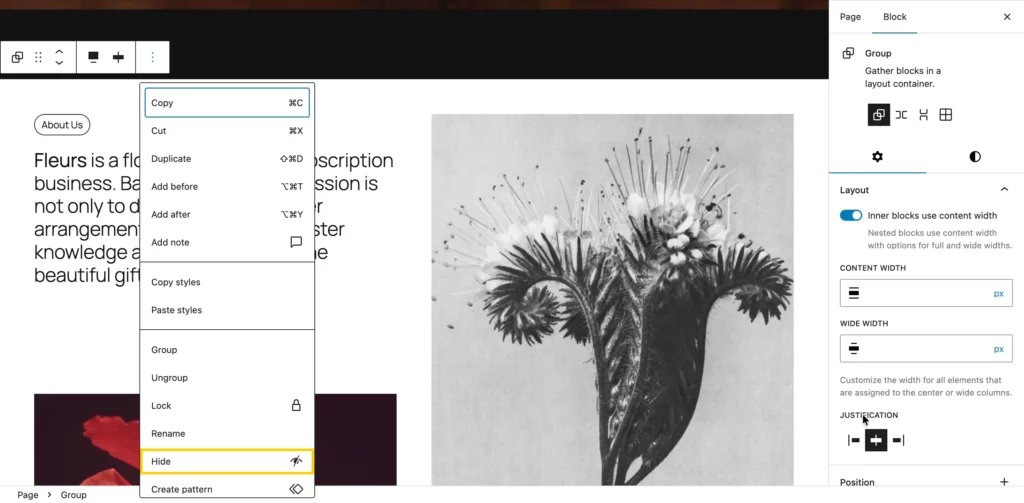
In this version, the blocks can be hidden on the front end rather than removed entirely, keeping them accessible to the editor, and the feature is quite helpful either for testing layouts or for preparing seasonal content.
Better Content Creation and Collaboration
WordPress 6.9 improves teamwork and editing by providing collaborators and creators with tools that facilitate and expedite writing and review purposes. Collaborating on posts and pages is now more natural, less time-consuming, and significantly more intuitive. Whether your goal is to draft, edit, or refine the final details, there are new methods to comment directly on text and more seamless interactions with blocks.
Content-Only Pattern Editing
The 6.9 introduces Content-Only Pattern Editing, allowing users to edit text and images within patterns without changing their layout or design. This feature helps maintain visual consistency while making content updates easier. It’s ideal for teams where designers set layouts and content editors simply update the text or media — keeping websites clean, structured, and visually consistent.
1. Block-Level Commenting
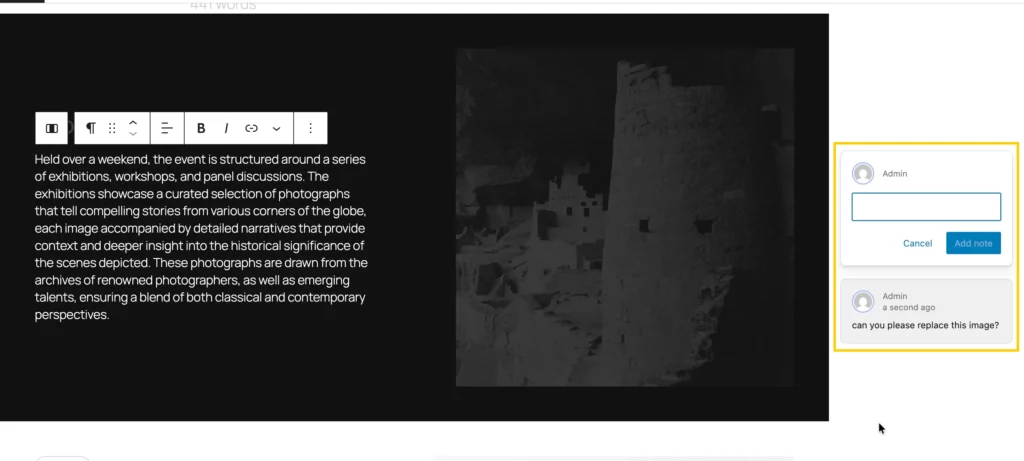
Block-level commenting allows editors and collaborators to add comments directly on individual blocks. This minimizes back and forth during content generation and clarifies review procedures.
2. Improved Block Interactions
Improvements in block interactions make everyday editing tasks much smoother than before, as the improvements in drag-and-drop controls, expanded block transforms, and keyboard navigation make the editor simpler to use and easily accessible.
Developer-Focused Improvements
WordPress 6.9 introduces significant developer updates, focusing on APIs that improve flexibility and extendibility:
- Abilities API: The Abilities API acts as a new way to define and manage capabilities in a more consistent and systematic way.
- Interactivity API Updates: Updates to the Interactivity API result in improved block interactivity support, contributing to the creation of dynamic app-like experiences without needing any specialised JavaScript frameworks.
- Block Bindings: Block bindings open the door for more advanced data-driven designs and enhance the connection between blocks and external data sources.
- HTML API Updates: Refines the HTML API to improve parsing, validation, and customization, giving developers greater control over content rendering.
These updates strengthen WordPress as a developer-friendly platform, enabling cleaner, more scalable projects.
New Blocks to Explore in WordPress 6.9
1. Accordion block
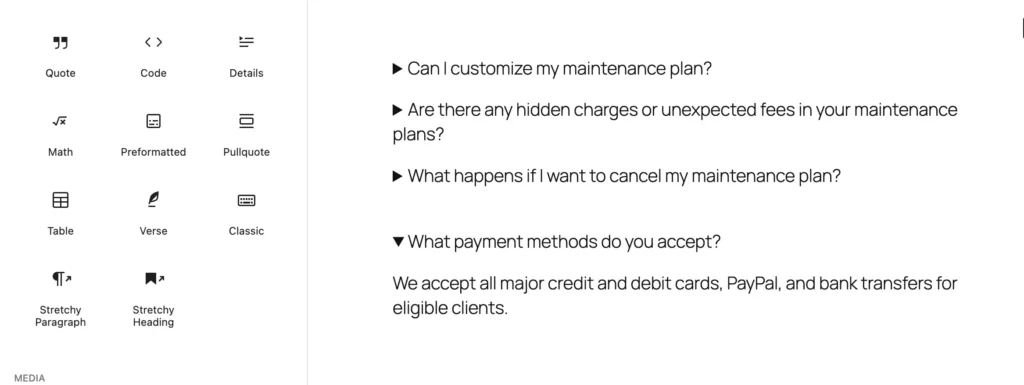
The Accordion block allows you to organize content into collapsible sections, making it an ideal option for FAQ guides or any lengthy content. It helps maintain a clean and interactive page, ensuring that visitors are not confused.
2. Math block
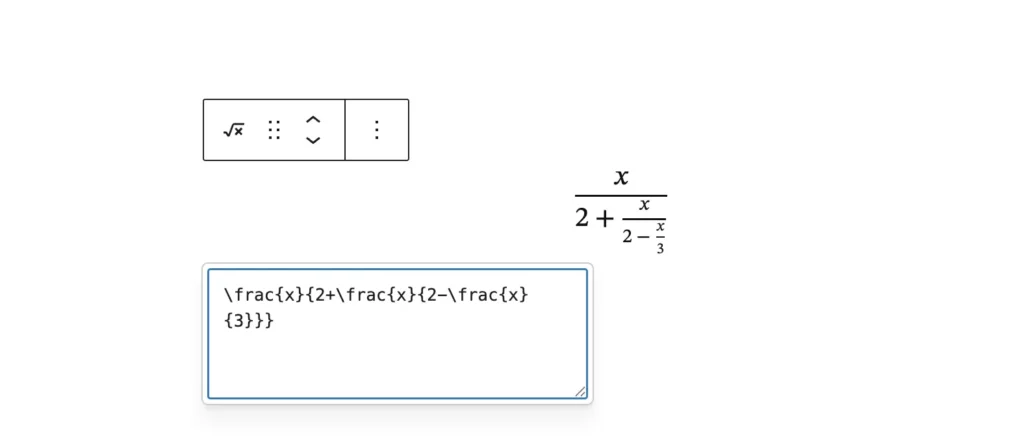
The Math Block allows you to incorporate mathematical expressions into your post or pages. It is ideal for teachers, students, and technical writers who want to present formulas accurately without using any third-party plugins.
3. Time to Read Block
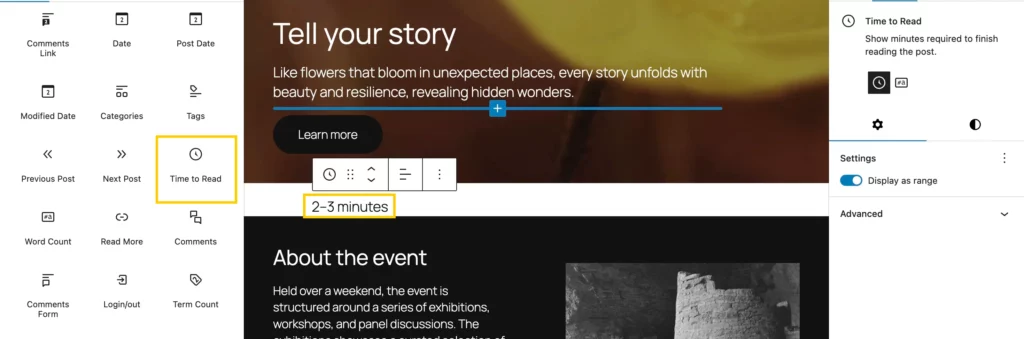
The Time to Read Block shows the estimated reading time required for your content. This simple yet effective enhancement boosts reader engagement and improves the overall reading experience.
4.Word Count block
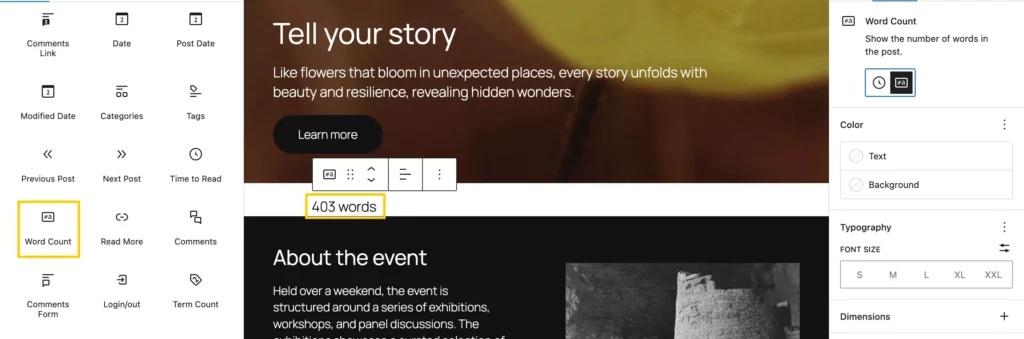
The Word Count block lets you instantly display the total number of words in your content, helping writers track their writing progress directly within the editor.
5. Term Query block
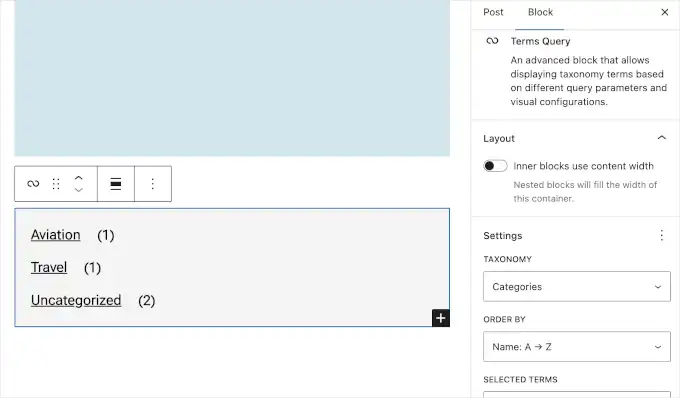
The Term Query block comes with the option to display a list of taxonomy terms, like categories, tags, or custom terms, in any layout you prefer. It’s a great option for dynamically arranging and displaying content groups.
6. Term Name block
The Term Name block, which I used within the Term Query loop, displays each term’s name, such as the title of a category or tag. For easier navigation, you can also link corresponding names to the archive pages.
7. Term Count block
The Term Count block enhances the Term Query configuration. It gives your taxonomy listings additional meaning and depth while assisting readers in quickly grasping the breadth of your content.
8. Tabs block
The tabs block gives you the option to display content in numerous tabs and makes it easier for users to switch between tabs to view different sections without leaving the page. This block offers a structured form that is perfect for product details, tutorials, or comparative charts.
9. Stretchy Heading
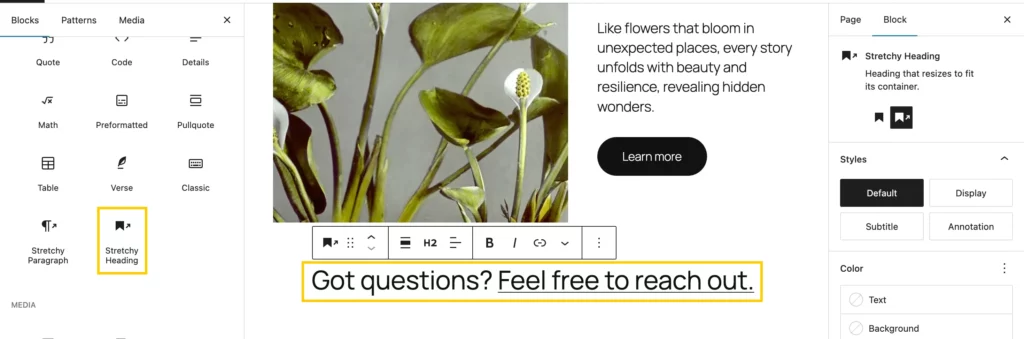
The Stretchy block enables your content to expand and occupy the available space, resulting in dynamic, full-width sections. It is ideal for banners, hero images, and other visual elements that must adjust to various screen sizes, providing a modern appearance.
10. Table of contents block
The use case of the table of contents block is that it automatically creates structured navigation for your posts and pages, and it’s very helpful in enhancing accessibility, readability, and user experience for your audience during the inclusion of lengthy articles.
Command Palette Everywhere
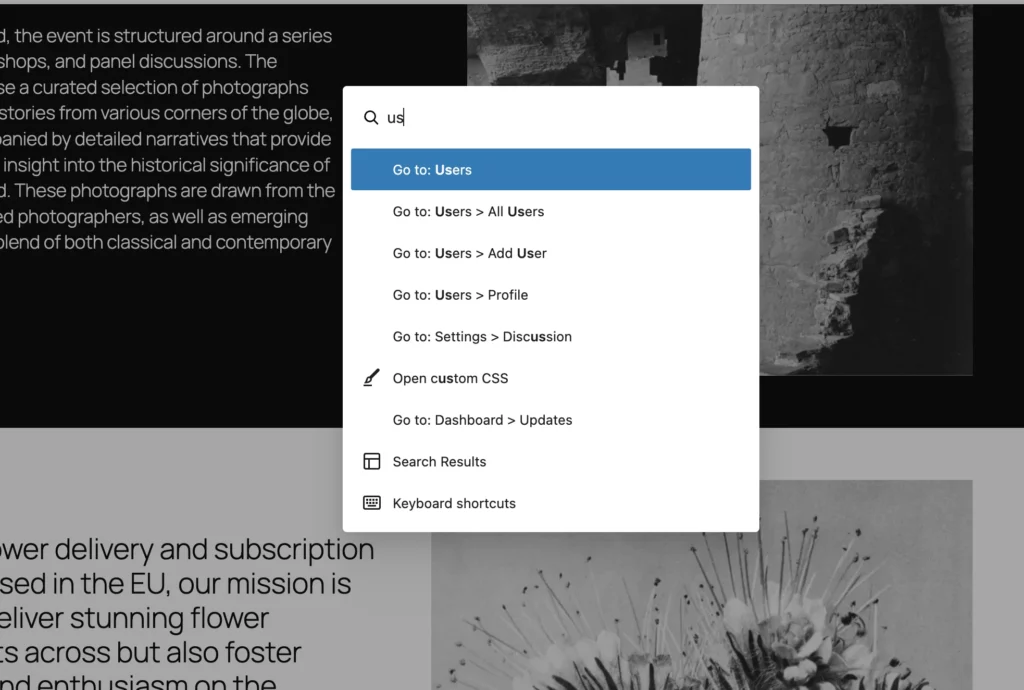
The command palette introduced in earlier versions acted as a quick search and action bar inside the editor and helped in adding a new page or inserting a pattern by simply typing a related command rather than hunting through menus.
With 6.9, the command palette has become more powerful and will appear in more places across the editor, resulting in better navigation and making everything keyboard-friendly. You can access it by using Ctrl + K or Cmd + K.
Performance Improvements
WordPress has always kept a high priority on performance, and version 6.9 comes up with a number of enhancements to improve website performance and functionality. The highlights are as follows:
1. Smarter Data Loading
This latest version of WordPress only retrieves the fields required for a request, rather than loading entire datasets. This speeds up queries and enhances editor responsiveness.
2. Better Script Loading with fetchpriority
This version of WordPress generates better script loading, as it supports fetchpriority attributes in ES modules and import maps, and these help in speeding up page rendering and allow browsers to load important scripts and assets first.
3. Unified Output Buffering
A single, standardized system for output buffering lets developers capture the full HTML before it’s sent to the browser. This makes caching, post-processing, and performance tweaks much easier to implement.
4. Faster Page Navigation with bfcache
With the help of the browser’s back/forward cache (bfcache), the page navigation has become smoother even for nocache-marked pages and contributes to creating an app-like experience.
5. Stylesheet Optimization
This version of WordPress focuses on improving CSS handling through improved inlining and minification. These are highly beneficial in speeding up styling and reducing the page size, particularly on websites with numerous style files.
No New Default Theme
Compared to the previous versions, WordPress doesn’t introduce any new default themes. Instantly, they focused mainly on refining the existing block themes and improving the site editor, and allowed WordPress to make improvements to its existing tools.
Early Preview Features
These versions of WordPress come up with a glimpse of what’s to be expected in future releases, and these features will be offered as optional plugins or experiments rather than being included in the core:
- Admin Interface Refresh: A modernized admin design focused on improving usability.
- MCP Adapter: Support for the Model Context Protocol, making it easier for AI tools to interact with WordPress.
- PHP AI Client SDK: A toolkit that helps developers connect WordPress with AI services.
These aren’t fully polished yet, but they show where WordPress is headed in the next releases.
WordPress 6.9 beta versions
21st October 2025 | Beta 1 – Core contributors focus on testing and fixing bugs. Begin writing Dev Notes and the About page. |
28th October 2025 | Beta 2 – Continue testing, fixing bugs, and writing Dev Notes and the About page. |
4th November 2025 | Beta 3 – Further testing, bug fixing, and documentation updates. |
11th November 2025 | Release Candidate 1 – Publish Field Guide, commit the About page, draft release post, hard string freeze, and branch for release. |
18th November 2025 | Release Candidate 2 – Update About page images and continue drafting the release post. |
25th November 2025 | Release Candidate 3 – Finalize About page images and draft release post. |
1st December 2025 | Dry Run – Conduct a dry run for WordPress 6.9 release with a 24-hour code freeze. |
2nd December 2025 | Final Release – WordPress 6.9 officially released! |
Check out what’s new in WordPress 6.9 by interacting with it directly in the WordPress Playground.
Additional tips to consider while updating
- Run Updates on a Staging Environment First: Before implementing the latest WordPress version on your live website, always look to test it on a staging site first, as it lowers the risk of downtime and allows you to identify possible conflicts in a completely controlled environment.
- Keep a Full Site Backup Ready: Before upgrading to the new version, make a full backup of your database and your files, as it will become helpful in restoring the website if something goes wrong during the upgrade.
- Verify Plugin & Theme Support for the version: Verify closely the themes and plugins you currently use to confirm whether they are compatible with the latest version, and also look to review developer notes or changelogs to make sure there will be no functionality errors after the update.
- Clear Browser and Site Cache After Updating: After completing the update, clear the browser cache and any caching plugin present on your website; this prevents the showing up of the outdated cached files and ensures you are viewing the most recent updates.
- Upgrade PHP for Better Security & Speed: Verify that the most recent or suggested version of PHP is used on your hosting environment, as updated PHP guarantees complete compatibility and increased performance and security.
- Monitor Your Site After the Update: After the update, make sure to test all important site functions, such as forms. checkout, navigation, and look to fix any issues before they affect visitors.
Final Thoughts
The WordPress 6.9 version is more than just one major feature but a combination of speed, future readiness, and many more. WordPress is on the path to becoming a versatile, quick, and cooperative publisher with the enhancements made to the site editor, developer APIs, and other performance optimizations.
If you are a site owner, you will be rewarded with a speedier site and a more fluent editing experience, and developers will be rewarded with new optimization opportunities and more dependable APIs. Overall, the version is helpful for most use cases.
As always, it’s a smart idea to test your website with beta versions to experience the new features and get ready for the launch.

Leave a Reply
Articles
Related Insights.
Blogs and Resources on WordPress, WooCommerce, SEO and Marketing

Leave a
Comment.